setting up the bar…
Mobile coffee cart at weddings & private events
How guests opt in to text messages
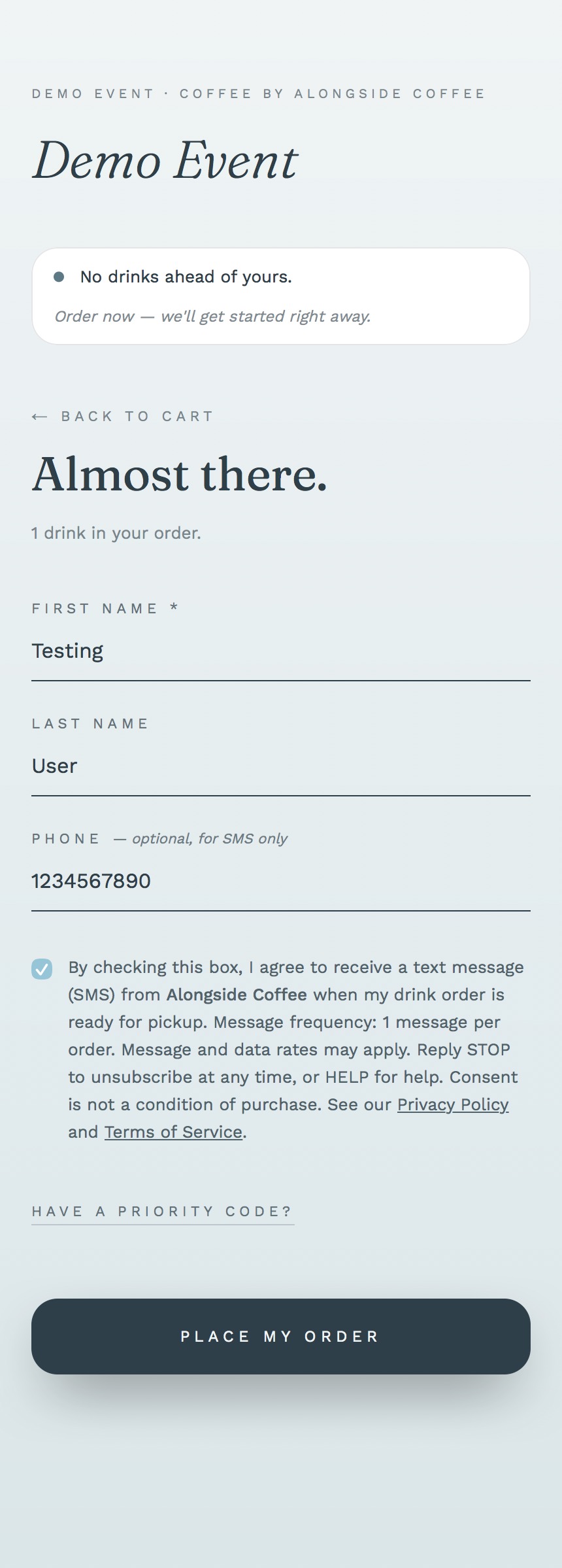
The exact consent disclosure shown to guests at point of order, when they agree to receive text messages (SMS) from Alongside Coffee about their order, a confirmation and a drink-ready alert, and to join their loyalty & rewards program.
The opt-in form, check the box to consent
This is the exact SMS-consent step from the Alongside Coffee order form. The box is unchecked by default, the order can’t be submitted, and no text is ever sent, until the guest checks it. The button stays disabled until the box is ticked.
The order can’t be submitted until the consent box is checked.
Scan to open this consent disclosure
Scan this code to open this consent disclosure on your phone, the same consent a guest agrees to. At the cart, the printed QR opens the web order form shown above, where this exact unticked SMS box appears. Scanning never opts anyone in; no text is sent unless the box is checked.
How guests opt in
Alongside Coffee runs a mobile coffee cart at weddings and private events. Guests order from a web form on their phone, reached by scanning a QR code at the cart, or via a shared link. On that form they may optionally enter a phone number and check an unticked SMS-consent box to receive text messages (SMS) about their order, an order confirmation and a “drink ready” alert, and to join the operator’s loyalty & rewards program, which sends occasional perks, offers, and giveaway prizes.
Consent is collected on that form at the point of order, never in advance, never by import, never by inference. The guest must take an affirmative action, checking the unticked box on their phone, before any phone number is saved or any text message is sent. Consent is not a condition of purchase.
Guests who order at the counter are asked out loud. Most events collect no phone at the counter at all; the field appears only when the operator switches it on, and it is always optional. When it is on, the barista reads the same wording aloud and ticks an unticked box recording that the customer said yes, before any number is kept. A number given at the counter is stored and used exactly like one given on a phone, and never without that agreement. A guest who declines is called by name when the drink is ready.
The web form · the consent every guest sees
The interactive consent form at the top of this page is exactly what every guest sees on the order form before submitting, the checkbox is unchecked by default, and the order cannot be submitted until they check it. That disclosure includes:
- · Affirmative consent framing (“By checking this box, I agree to receive a text message (SMS)”).
- · Sender identity named: Alongside Coffee.
- · Message purpose disclosed: order confirmation + drink-ready pickup alert, and the operator’s loyalty & rewards program (occasional perks, offers, and giveaway prizes).
- · Frequency disclosed: varies, up to 2 messages per order, plus occasional rewards messages.
- · Full-text “Message and data rates may apply” disclosure present.
- · STOP and HELP opt-out keywords disclosed.
- · Privacy Policy + Terms of Service links present and clickable.
- · “Consent is not a condition of purchase” statement present.
- · Checkbox is unticked by default, no pre-checked consent.
The same consent on the live order form
Captured from the Alongside Coffee order flow in production on iOS Safari, the same SMS-consent box shown above, on the real order form. A placeholder name and phone number are used; real guest data is never displayed publicly.
Sample message
Alongside Coffee: your latte is ready for pickup at the Sarah & David cart. Reply STOP to unsubscribe, HELP for help.
Every message begins with “Alongside Coffee” so the recipient immediately identifies the sender. STOP and HELP are handled automatically by the carrier’s standard opt-out mechanism.
Policies
Alongside Coffee · alongsidecoffee.com · alongsideevents.com